For Multi-Location Businesses
Every branch, run on AI.
We set up every branch to run on AI and keep it running. Enquiries get answered, bookings go to the right outlet, and managers see every branch in one place.
Free. No obligation. Plans from $199/mo billed yearly.
Straight answers on running multiple branches
The questions every multi-branch owner asks on the first call, answered without hedging.
- How do we keep each branch separate?
- Give each branch its own inbox and restrict its staff to it. Someone restricted to the Tampines inbox cannot open a Jurong conversation, including by direct link.
- What does a manager see across all branches?
- Owners and admins see every inbox in the workspace. A manager reads Tampines and Jurong from the same screen instead of asking each outlet for a screenshot.
- Who owns an enquiry?
- Every conversation carries an assignment, and one person owns it at a time. The owner is visible on the conversation rather than agreed in a staff group chat.
- What happens when a customer messages the wrong outlet?
- Assign it to the person who should own it. The chat history goes with the assignment, so the new owner reads what was already said instead of asking the customer to repeat it. Managers see every inbox, so nothing sits in the wrong branch unnoticed.
- What does the conversation leave on the record?
- Name, service, branch, status, quote, invoice, and next action are written to the customer record while the chat happens. The CRM and record tables are built in, so the AI updates them directly, and you can add your own tables for whatever else a branch tracks.
- How does reporting break down by branch?
- Reporting breaks down by inbox, so each branch reads on its own. Time from a customer message to the first human reply is measured and reported per inbox, which is how a slow branch shows up as a number rather than a complaint.
Sound familiar?
Messages fall through the cracks between branches.
A customer messages your Tampines outlet about a booking. It sits unseen for two days. By the time someone replies, they've already booked with your competitor down the road.
You have no idea what staff are saying to customers.
Each branch runs its own WhatsApp. Different phones, different reply styles, different information. You only find out there's a problem when a customer complains.
Every branch does things differently.
One outlet quotes the right price. Another gives outdated information. A third doesn't reply on weekends. Your brand feels like three different businesses.
Every branch in one place
Tampines, Jurong East, Bukit Timah. Each branch keeps its own number. You see every branch in one place, and bookings go to the right outlet.
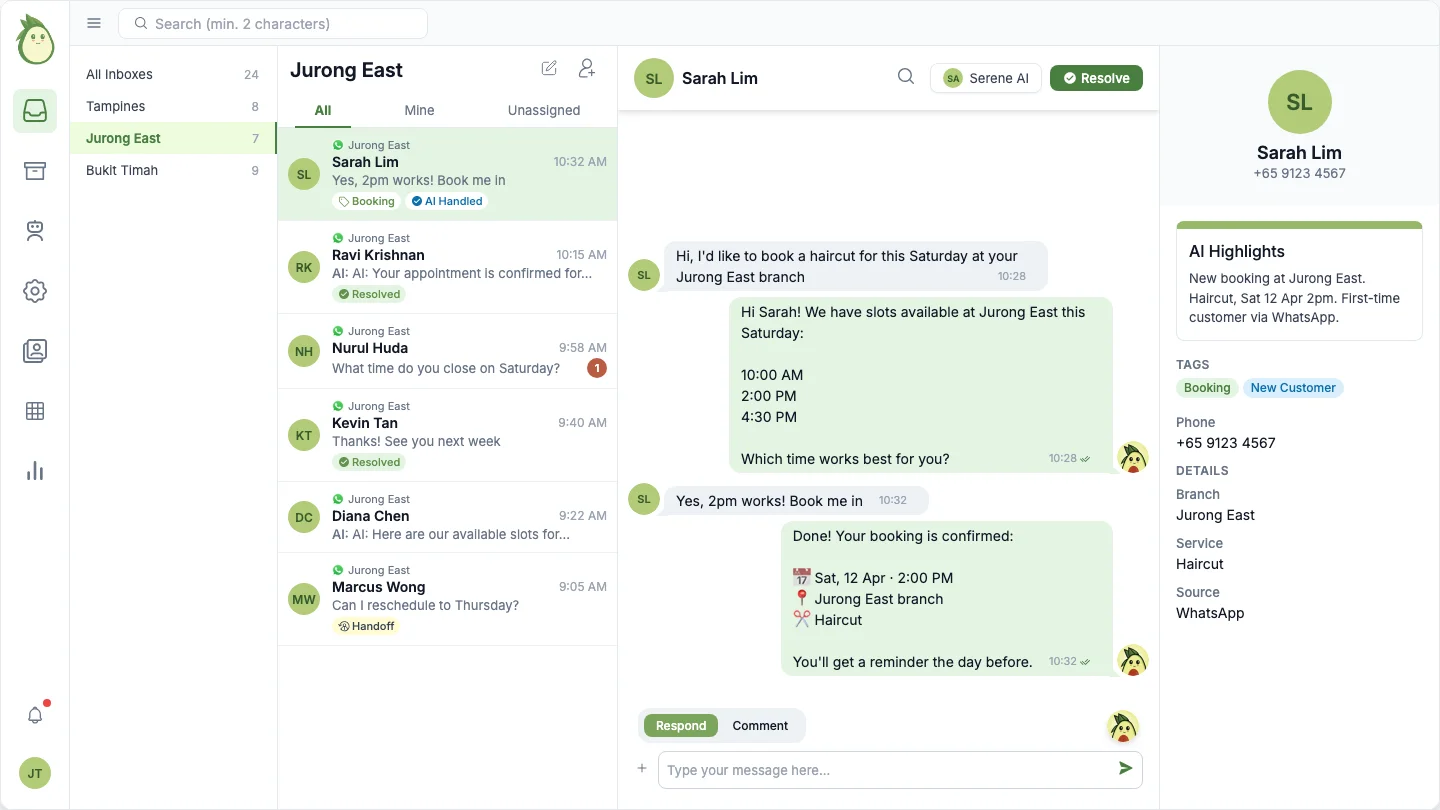
What gets handled across every branch
Others hand you software. We set up every branch, train the AI, and keep it running.
Each branch gets its own WhatsApp number and inbox
Tampines has its own number. Jurong has its own number. Customers message the branch they want. Every conversation stays organised by outlet.
Staff only see their own branch
Your Tampines team sees Tampines conversations. Your Jurong team sees Jurong. Each team stays focused on their own customers.
Consistent answers across all branches
We train the AI once on your business. It knows which branch a customer is messaging and answers accordingly. Same quality, same accuracy, every outlet.
Bookings go to the right branch automatically
Customer wants a Tuesday slot at your Bukit Timah outlet? The AI checks that branch's availability and books it. The right slot, the right branch, every time.
One dashboard to see everything
Open one screen and see every branch. Every conversation, every booking, every unanswered message. You stop checking three phones.
We set it up, train the AI, and manage it
You tell us about your branches. We configure each inbox, set up access for your staff, and train the AI on your services. Adding a new outlet? We handle that too.
One set of records across every branch
Customers, bookings, and jobs sit in one CRM and ERP with the location on each row. No branch keeps its own spreadsheet.
Automations that respect the branch
Reminders, follow-ups, and escalations fire per location, using each branch's own hours and staff.
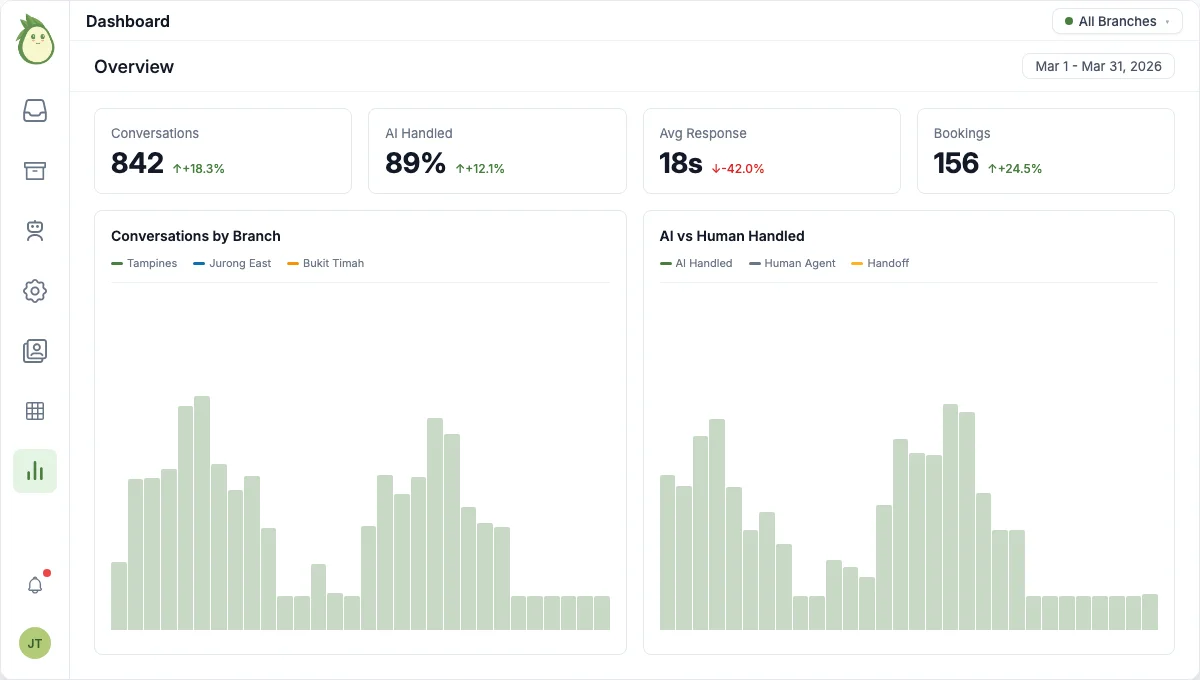
See every branch's metrics in one dashboard. Filter by outlet, track AI performance, spot issues before they grow.
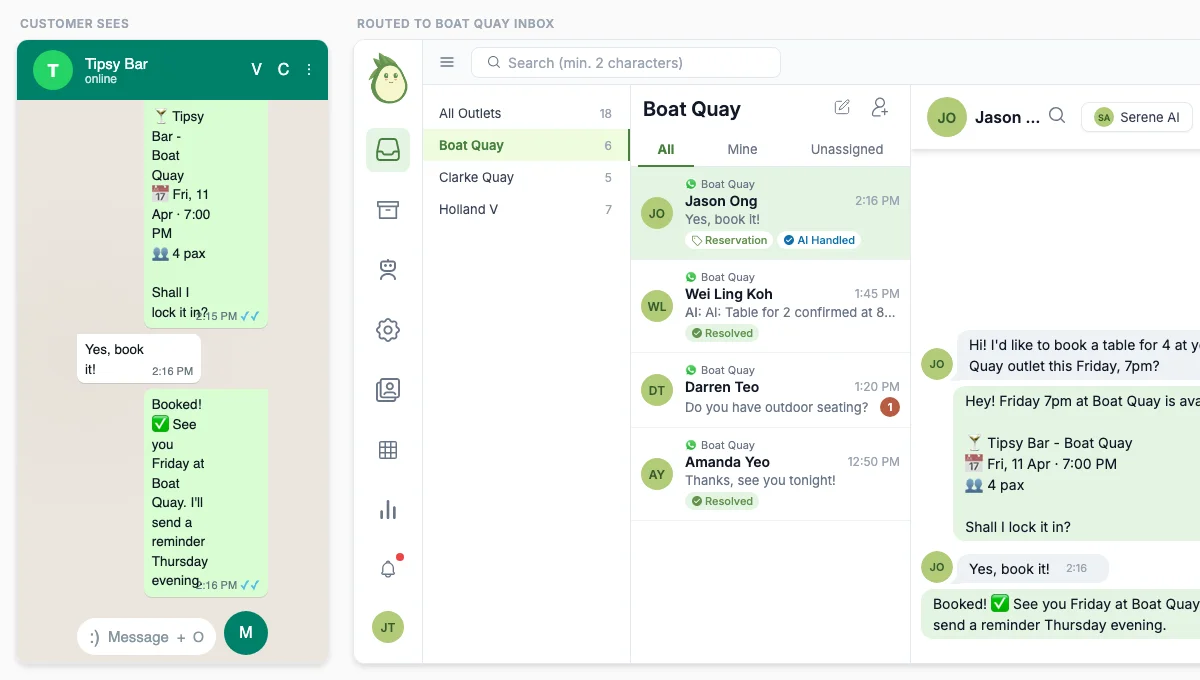
Customer messages one number. AI books the right branch. Your team sees it in the right inbox.
60+ businesses across Singapore and Malaysia run on AI with us









A bar group with 3 outlets used to run a separate WhatsApp phone for each branch. Staff replied from the wrong number, and customers got confused. Now AI answers every branch's enquiries with that branch's menu, and the team saves 40+ hours a month.
Used by businesses from 1 to 5+ locations. Planning a migration? See our step-by-step guide.
How we set up your branches
You tell us about your branches. Services, hours, staff, pricing.
We migrate your WhatsApp numbers and set up each inbox. Your customers keep the same number.
We train the AI on each branch's details. We set up the first branch, you check it, then we add the rest.
The cost of doing it yourself
A part-time receptionist costs $1,500/mo per branch. Three branches, that is $4,500/mo just for people to answer WhatsApp.
chatavocado starts from $199/mo billed yearly, with coverage day and night. We confirm the plan once we see how your branches work, then train the AI on every branch and keep it running.
Before you message us
Can each branch have its own WhatsApp number?
Yes. Each branch gets its own WhatsApp Business number and its own inbox. Customers message the branch they want, and conversations stay separate.
Can staff only see their own branch's conversations?
Yes. We set up access controls so each team only sees their branch. Your Tampines staff won't see Jurong's conversations, and vice versa.
What if we open another branch later?
We set it up for you. New WhatsApp number, new inbox, staff access configured. The AI already knows your business, so each new branch is faster than the last.
Do we need to change our existing WhatsApp numbers?
No. We migrate your existing numbers into the system. Your customers keep messaging the same number they already have saved.
How long does setup take for multiple branches?
It depends on how many branches and systems you have. We set up the first branch, you check it, then we add the rest.
How much does it cost for multiple branches?
Plans start from $199/mo billed yearly. We confirm the plan once we see how your branches work.
Talk to our AI about your business.
Our AI replies straight away. Ask it anything, the way your customers would.
What happens next: our AI replies straight away, you show us the work taking up your time, and we recommend one job to hand over first. You decide if it is useful.
60+ businesses run on it. We take on a handful of new ones each month.
