Service Report Template: Photos and Example

Download the Word service-report template, a printable PDF or a completed maintenance example below.
Download the service report template
Use Word to add your logo, edit the fields and insert photos. Print the blank PDF if your team fills in reports on site. Open the worked example to see how to write up a visit. Download any of them without signing up.
Write what your technician found under findings, then explain what they fixed under work completed. For a leaking tap, record the leak and the worn washer first. Then record the washer replacement and the checks.
Record the details your customer needs
Give your customer enough detail to understand the visit without calling your office. Start with where your technician went, what they found and what they did.
| Part of the report | What to record |
|---|---|
| Job details | Add the report number, customer, site and equipment. Include quotation and invoice references if you have them. |
| Visit and issue | Record when the visit started and ended. Describe the reported problem and what your technician found. |
| Work and checks | Describe the repair, parts used and checks. List any work your team still needs to do. |
| Site photos | Add the relevant photos and caption each one. Label before and after photos clearly. |
| Prepared by and acknowledgement | Name the person who prepared the report and add the date. Record whether the customer has acknowledged it. |
Use the same report number in the document, photo folder and job record. Your admin can search for “SR-DEMO-001” instead of asking which tap job the technician meant.
Add an invoice reference after you issue the invoice, and track payment separately. If your team also prepares invoices by hand, see how LinkTrade changed its invoice process.
See how to write up a maintenance visit
We've filled in one report using Avo Maintenance, a fictional business. We made up the customer, technician and visit to show you how to use the template. The photo spaces contain placeholders.
Alex visits Example Offices to fix a dripping pantry tap on 26 September 2026. He starts at 09:10, replaces a worn washer and checks the tap before finishing at 09:45. He records each step in the report.
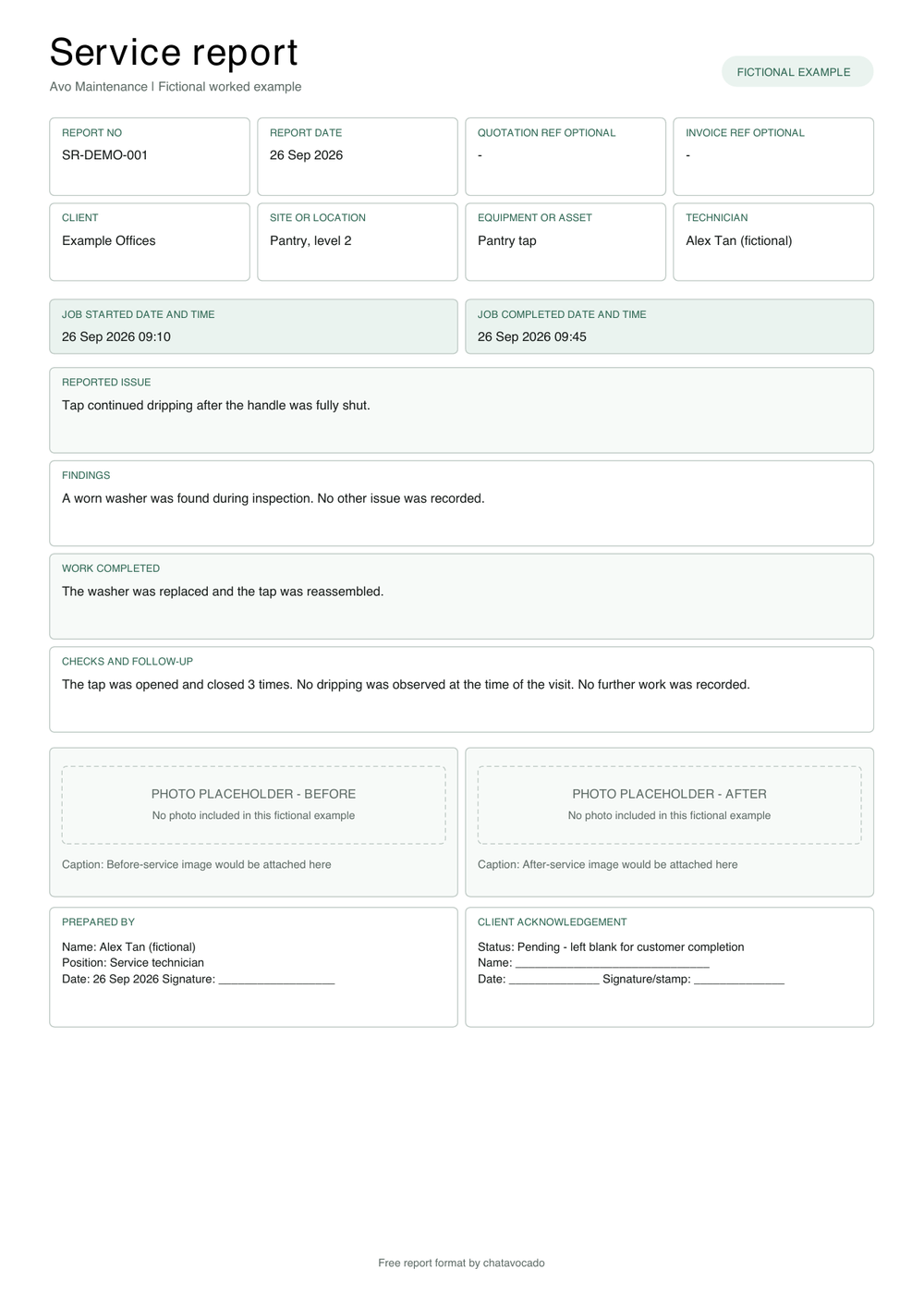
Be specific about the work. “Replaced the worn washer and reassembled the tap” tells your customer what Alex repaired. “Opened and closed the tap three times; saw no dripping during the visit” explains how he checked it. Two clear sentences give your customer more to work with than “tap repaired”.
Turn WhatsApp notes and photos into a report
Ask your technician to send the job reference, visit times, findings and completed work in one update. Your admin can then prepare the report without piecing together messages from several chats.
SR-DEMO-001, Example Offices, level 2 pantry. 26 Sep, 09:10 to 09:45. Tap was dripping when shut. Found a worn washer. Replaced it and reassembled the tap. Opened and closed it three times, no dripping observed during the visit. No further work recorded. Alex Tan. Customer acknowledgement still pending.
Use that fictional message as a starting point. For a real visit, attach the site photos and add a short caption for each one. Ask the technician to fill in any missing details before you finish the report.
- Find the customer and site using the job reference.
- Fill in the issue, findings, repair and checks. Add any follow-up work.
- Insert the photos and captions. Save the original files with the job.
- Check the details and photos against the technician's update.
- Export the report to PDF, send it to the customer and save a copy. Ask for acknowledgement if your agreed process requires it.
If your team repeats these steps every day, show us how they prepare a report. We can help you work out which steps to automate and where your team checks the draft. Read about job report automation or see what an AI WhatsApp assistant can do for your team.
Check the report before you send it
Before you send the PDF, check these five things:
- Have you selected the right customer, site and equipment?
- Does the report explain what your technician found, fixed and still needs to do?
- Do the dates, times and references match the job record?
- Can your customer understand what each photo shows?
- Have you added the preparer's name and recorded whether the customer has acknowledged the report?
Replace the sample details with your own. If you need more space for photos, add a page in Word and repeat the report number at the top. Keep the photos large enough for your customer to see the work.
Adapt the template for your next job
Add your business name and contact details, then keep the fields your team uses. For an aircon visit, you might add equipment readings and serial numbers. For a repair, leave enough space to describe the fault, parts and checks.
Try it on one job and ask your admin what they still had to chase. Use that feedback to adjust the template before rolling it out to the team.
If your team also needs to track enquiries and job updates, see the field service overview.
Frequently asked questions
What should a service report include?
Record where your technician went, what they found, what they did and what still needs work. Add the job reference, visit times, captioned photos and the preparer's name. Leave a separate space for the customer to acknowledge the report.
Can I use this maintenance service report template in Singapore?
Yes. Edit the Word template for aircon, plumbing or building maintenance visits in Singapore. Add the readings and fields your customer needs. Use a specialist inspection form where the job requires one.
Can I include WhatsApp photos in a service report?
Yes. Add the photos to the right job and caption each one so your customer knows what they're looking at. Include the equipment or location where it helps. Save the original files with the job record.
Is a service report the same as an invoice?
No. Use the service report to explain the work and the invoice to bill for it. Add the invoice reference once you've issued it. Track payment separately.
Does the customer need to acknowledge every service report?
Follow the process you've agreed with your customer. If you need their acknowledgement, ask them to complete that section after reviewing the report. Leave it blank and mark it pending until they do.
Spend less time putting reports together
Send us your current report and a sample of your technician's notes. We'll work through how your team can turn those updates into a report, check it and send it to the customer.
See how AI prepares job reports